





Google has put an end to all-or-nothing channel targeting, and has launched new sets of controls for advertisers.
Google Ads has introduced a new set of controls for advertisers to customise their targeting.
Advertisers will soon get the ability to choose which channel they want to prioritise for their budgets, with ‘high priority’ and ‘low priority’ categories for channels and channel groupings.
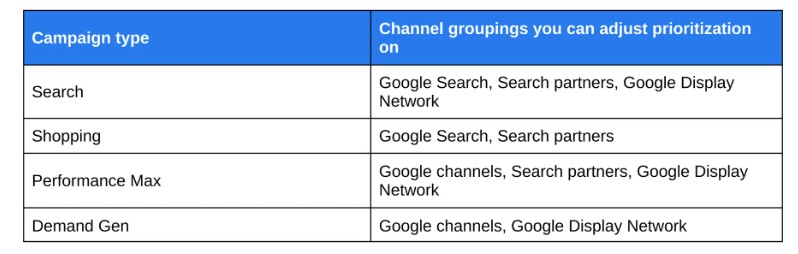
Controls will roll-out across search, shopping, Demand Gen, and Performance Max, and will launch in 2027.
When controls are configured, Google Ads will make sure that prioritised channels are fully funded within their target cost-per-acquisition (CPA) or return-on-ad-spend (ROAS), before allocating the rest of the budget.
Within Performance Max and Demand Gen campaigns, Google channels are grouped together to include YouTube, search, maps, gmail, and discover.
Google is also launching more flexible budget allocation controls for channels.
Those which are set at ‘low priority’ will be more highly customisable and advertisers will be able to specify a boundary from their daily budget by setting maximum percentages.
Tal Akabas, director of product management at Google Ads explained: “On a best-effort basis, our tools will aim to keep spend on those channels within that limit. This is particularly helpful for campaigns with target CPA or target ROAS bidding that are not limited by budget since channel prioritisation alone will generally not have an impact there.”
This is a significant step for marketers, who have previously relied on an all-or-nothing opt-out system. The new levers with clearer limits aim to give marketers the tools to operate and experiment with confidence.
Akabas continued: “Marketers who have campaigns currently running on search partners or the Google Display Network have the option to set a budget allocation should they choose.”
To keep the current configuration, marketers can set the Google Display Network to ‘low priority’ and give 50% budget allocation.